Dashcam Viewer v4.0.8 was released today for both Mac and Windows. This is a minor update to add Garmin Dash Cam X310 support. Version 4 is a free update for all Dashcam Viewer users.
New Camera Supports:
Added support for Garmin Dash Cam X310
Dashcam Viewer v4.0.8 showing Garmin Dash Cam X310 video and data
Dashcam Viewer and Dashcam Viewer PRO are PC/Mac applications that allow you to play your dashcam’s videos while simultaneously viewing your vehicle’s location on a map. There are many other features in the software which are detailed on our website (https://dashcamviewer.com). The free version is fully-functional and allows the loading of up to 2 videos at a time.
Dashcam Viewer v4.0.7 was released today for both Mac and Windows. Version 4 is a free update for all Dashcam Viewer users.
New Camera Supports:
Added support for YDI MC10 dashcam
Added 2-channel PiP support for Vantrue E2
New Features:
[PRO version] Added new Elevation Grade graph. If the dashcam or action-cam supports Altitude data, Dashcam Viewer PRO will now display a graph of Elevation Grade in addition to Altitude. Elevation Grade is a plot of elevation slope, which is based on altitude data. Special controls have been added to the Preferences menu to control how the grade is computed and smoothed.
New “Elevation Grade” graph in Dashcam Viewer PRO
Increased precision from 3-digits past the decimal to 8 in the latitude/longitude data written to the EXIF block when performing a JPG snapshot.
Bug Fixes:
Fixed bug in Dashcam Viewer Plus version in which the red motorcycle was replaced by a silver car as the compass pointer
Fixed lockup that could occur when loading small videos
Fixed tab ordering issue in Preferences window if some tabs were hidden
Notes:
Added front/rear PiP display support for Cobra HD2216D; however, GPS data display may not work yet.
Improved support for ROVE R2-4K but issues still exist. Work in progress
Dashcam Viewer and Dashcam Viewer PRO are PC/Mac applications that allow you to play your dashcam’s videos while simultaneously viewing your vehicle’s location on a map. There are many other features in the software which are detailed on our website (https://dashcamviewer.com). The free version is fully-functional and allows the loading of up to 2 videos at a time.
Dashcam Viewer v4.0.6 was released today for both Mac and Windows. Version 4 is a free update for all Dashcam Viewer users.
New Camera Supports:
Added support for Kenwood DRV-A510W 2-channel
Added support for GoPro HERO 13 GPS data
New Features:
Click-to-Go is now enabled on the Map display by default.
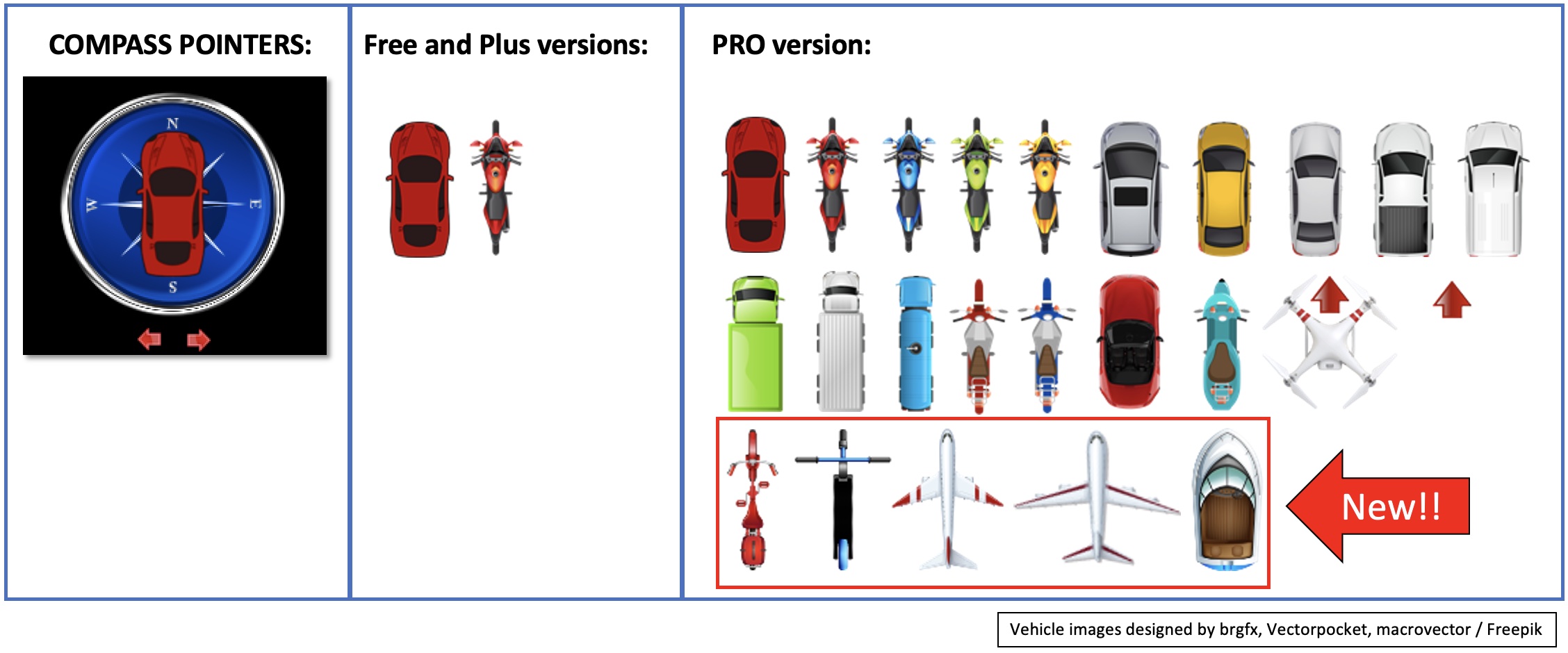
[PRO version] Added 5 new compass pointers to the PRO version of Dashcam Viewer (2 airplanes, bicycle, boat, scooter).
Compass pointers used in Dashcam Viewer Free, Plus, and PRO
Bug Fixes:
[Windows] Fixed bug in which GPS data was not read properly for very large video files. This bug was reported with a Viofo A229 Pro dashcam.
Fixed bug in which the weather report at time of drive was off by the timezone difference relative to UTC.
Fixed crash that could occur if user zoomed the video too far.
Dashcam Viewer and Dashcam Viewer PRO are PC/Mac applications that allow you to play your dashcam’s videos while simultaneously viewing your vehicle’s location on a map. There are many other features in the software which are detailed on our website (https://dashcamviewer.com). The free version is fully-functional and allows the loading of up to 2 videos at a time.
Dashcam Viewer v4.0.5 was released today for both Mac and Windows. Version 4 is a free update for all Dashcam Viewer users.
New Features:
Added a “Cancel” button to the Video Load progress bar. Clicking the button will abort importation of a large set of video files. The video files that have been loaded up to that point will still be processed and displayed.
Screenshot
Dashcam Viewer and Dashcam Viewer PRO are PC/Mac applications that allow you to play your dashcam’s videos while simultaneously viewing your vehicle’s location on a map. There are many other features in the software which are detailed on our website (http://dashcamviewer.com). The free version is fully-functional and allows the loading of up to 2 videos at a time.
Dashcam Viewer v4.0.3 was released today for both Mac and Windows. Version 4 is a free update for all Dashcam Viewer users.
New Camera Supports:
Added support for Miofive S1 Ultra 2-channel dashcam
Bug Fixes:
Fixed bug that would crash Dashcam Viewer when loading a Miofive S1 video that had not yet acquired GPS signal.
Dashcam Viewer showing Picture-in-Picture and GPS data for Miofive S1 Ultra
Dashcam Viewer and Dashcam Viewer PRO are PC/Mac applications that allow you to play your dashcam’s videos while simultaneously viewing your vehicle’s location on a map. There are many other features in the software which are detailed on our website (http://dashcamviewer.com). The free version is fully-functional and allows the loading of up to 2 videos at a time.
Dashcam Viewer v4.0.2 was released today for both Mac and Windows. Version 4 is a free update for all Dashcam Viewer users.
New Camera Supports:
Added support for Miofive S1 dashcam
Added support for Viofo A229 Pro with latest firmware (fixes unrecognized 2nd channel video)
Recognizes Innovv K3 “parking” mode and “accident” mode front/rear files.
Recognize 12x timelapse mode (supported by Vantrue E1)
Bug Fixes:
Changed the way that DCV ascertains GPS data encoding scheme. Now the midpint file of the video group being loaded is examined for GPS data instead of the first video. The rationale is that the first video is more likely to have incomplete GPS data so choosing the mid file is more promising for detecting the data encoding scheme.
Minor improvements to Reset Window Positions and Clean Up Windows functions.
Dashcam Viewer v4.0.2 with Miofive S1 video and GPS data displayed in Map/Graphs
Dashcam Viewer and Dashcam Viewer PRO are PC/Mac applications that allow you to play your dashcam’s videos while simultaneously viewing your vehicle’s location on a map. There are many other features in the software which are detailed on our website (http://dashcamviewer.com). The free version is fully-functional and allows the loading of up to 2 videos at a time.
Dashcam Viewer v4.0.0 was released today for both Mac and Windows. Version 4 is a free update for all Dashcam Viewer users.
New!
First release of Dashcam Viewer built specifically for Apple Silicon CPUs (M1, M2, M3, etc)
New Camera Supports:
Added support for NextBase 380GWX
Added support for NextBase 412GW
Added 2nd channel support for Innovv K6 (note: this dashcam does not have GPS)
Bug Fixes:
Added fuzzy search for 2nd channel of DOD GS980 dashcam. This makes 2nd channel detection more accurate.
Fixed issue with Audio Detection. In some cases, the Audio Detection process was not invoked properly.
[Mac] Restored Google Maps functionality. Still a work in progress for Windows version.
[Mac] Fixed issue with JPG/PNG image capture area being shifted when selecting Export Image from toolbar.
[Mac] General GUI improvements and tweaks due to updated GUI framework
Dashcam Viewer v4.0.0 running natively on MacBook Air M1
Dashcam Viewer and Dashcam Viewer PRO are PC/Mac applications that allow you to play your dashcam’s videos while simultaneously viewing your vehicle’s location on a map. There are many other features in the software which are detailed on our website (http://dashcamviewer.com). The free version is fully-functional and allows the loading of up to 2 videos at a time.
Dashcam Viewer v3.9.8 was released today for both Mac and Windows.
New Camera Supports:
Added support for DOD GS980D
Added 2nd channel detection for YeeCore D22
Added 2nd channel detection for Thinkware F800 Pro (a.k.a., Alpine F800 Pro)
Added 2nd channel detection for Viofo A229 Pro, latest firmware
Bug Fixes:
Fixed bug when creating new geotag that would label the geotag “Untitled Event” even if the option to lookup address was selected. This bug was due to the reverse geocoding service no longer being available. A replacement reverse geocode service was found and the capability restored.
Fixed bug when creating a new geotag in which the geotag pushpin would not appear on the map. This was due to the removal of numbered markers URLs by Google.
Removed Google Maps option in the Maps view due Google killing the Maps API that was compatible with built-in browser in Dashcam Viewer. Until a workaround is found, MapQuest is now the default Map option. PRO users can also select OpenStreetMaps.
Now if the GPS data in the video is ‘bad’ (all zeroes, for example) a cache entry will not be created. This prevents bad data from being loaded from cache.
Dashcam Viewer v3.9.8 showing DOD GS980 video and new Geotag waypoint markers
Dashcam Viewer and Dashcam Viewer PRO are PC/Mac applications that allow you to play your dashcam’s videos while simultaneously viewing your vehicle’s location on a map. There are many other features in the software which are detailed on our website (http://dashcamviewer.com). The free version is fully-functional and allows the loading of up to 2 videos at a time.
Dashcam Viewer v3.9.7 was released today for both Mac and Windows.
New Camera Supports:
Added support for Viofo A119 Mini2 (shown below)
Added support for Viofo A139 Pro (shown below)
Added support for Cooau D30
Dashcam Viewer and Dashcam Viewer PRO are PC/Mac applications that allow you to play your dashcam’s videos while simultaneously viewing your vehicle’s location on a map. There are many other features in the software which are detailed on our website (http://dashcamviewer.com). The free version is fully-functional and allows the loading of up to 2 videos at a time.
Dashcam Viewer v3.9.6 was released today for both Mac and Windows.
New Camera Supports:
Added support for Thinkware U3000 Dual Channel (shown below)
Added support for LAMAX S9 Dual Channel
Bug Fixes:
Improved support for RoadHawk HD dashcam in which the GPS data contains bad timestamps
Dashcam Viewer and Dashcam Viewer PRO are PC/Mac applications that allow you to play your dashcam’s videos while simultaneously viewing your vehicle’s location on a map. There are many other features in the software which are detailed on our website (http://dashcamviewer.com). The free version is fully-functional and allows the loading of up to 2 videos at a time.
We use cookies on our website to give you the most relevant experience by remembering your preferences and repeat visits. By clicking “Accept”, you consent to the use of ALL the cookies.
This website uses cookies to improve your experience while you navigate through the website. Out of these, the cookies that are categorized as necessary are stored on your browser as they are essential for the working of basic functionalities of the website. We also use third-party cookies that help us analyze and understand how you use this website. These cookies will be stored in your browser only with your consent. You also have the option to opt-out of these cookies. But opting out of some of these cookies may affect your browsing experience.
Necessary cookies are absolutely essential for the website to function properly. These cookies ensure basic functionalities and security features of the website, anonymously.
Cookie
Duration
Description
cookielawinfo-checbox-analytics
11 months
This cookie is set by GDPR Cookie Consent plugin. The cookie is used to store the user consent for the cookies in the category "Analytics".
cookielawinfo-checbox-functional
11 months
The cookie is set by GDPR cookie consent to record the user consent for the cookies in the category "Functional".
cookielawinfo-checbox-others
11 months
This cookie is set by GDPR Cookie Consent plugin. The cookie is used to store the user consent for the cookies in the category "Other.
cookielawinfo-checkbox-necessary
11 months
This cookie is set by GDPR Cookie Consent plugin. The cookies is used to store the user consent for the cookies in the category "Necessary".
cookielawinfo-checkbox-performance
11 months
This cookie is set by GDPR Cookie Consent plugin. The cookie is used to store the user consent for the cookies in the category "Performance".
viewed_cookie_policy
11 months
The cookie is set by the GDPR Cookie Consent plugin and is used to store whether or not user has consented to the use of cookies. It does not store any personal data.
Functional cookies help to perform certain functionalities like sharing the content of the website on social media platforms, collect feedbacks, and other third-party features.
Performance cookies are used to understand and analyze the key performance indexes of the website which helps in delivering a better user experience for the visitors.
Analytical cookies are used to understand how visitors interact with the website. These cookies help provide information on metrics the number of visitors, bounce rate, traffic source, etc.
Advertisement cookies are used to provide visitors with relevant ads and marketing campaigns. These cookies track visitors across websites and collect information to provide customized ads.